Showing posts with label Eclipse. Show all posts

Sunday, 27 November 2016

Package-level javadoc comments

Problem:

How can I add package-level javadoc comments to my Java project?

Solution:

  • In your package's directory, add a file named "package-info.java"
  • In this file, include the package-level javadoc comment, as well as the package declaration

Example:

myprojectroot/mypackage/package-info.java:

/**
 * Provides an example package-level javadoc comment.
 * 
 * @since 1.0
 */
package myprojectroot.mypackage;

Additional hints:

  • in Eclipse, you can create this file by adding a "new file" to the package (instead of a new Java class, etc.)

References:

Thursday, 26 June 2014

Replaced ADT Eclipse and got errors such as "The type java.lang.Object cannot be resolved"

Problem:

I've installed the Juno version of the Eclipse-based ADT from the Google Android developers site in order to replace my outdated ADT. Now all of my existing android eclipse projects from my previous workspace have many errors such as "The type java.lang.Object cannot be resolved." and will not compile in the newly-installed ADT.

Steps to try:

The following steps fixed the issue on the author's system so they might be worth trying, (however it's not guaranteed that they will work):

  • Add any add-ons that may have been on your previous ADT build: http://developer.android.com/sdk/installing/adding-packages.html
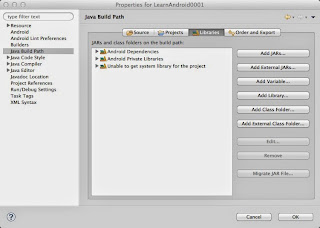
  • For each project, make sure that each has a valid Android target and Java system library
    • Right click on the project folder and click "properties"
    • Click on "Android" from the list on the left
    • Check an android version in "Project Build Target"
    • Click on "Java Build Path"
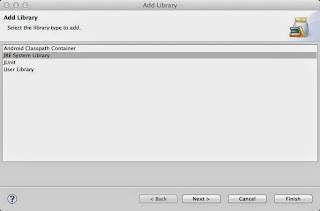
    • Click the "Add Library..." button on the right
    • Select "JRE System Library"
    • Choose an appropriate JRE and press "OK"

Explanation of the above steps:

The errors such as "The type java.lang.Object cannot be resolved" are due to the new ADT being unable to find the system's java library (or the library that is installed is currently invalid.) Pointing your project to the appropriate Java JDK should fix this problem. However, this doesn't fix everything.

The next errors regarding android.* and related means that the old ADT pointed to an Android target that likely no longer exists after the upgrade. Pointing the project to the new Android target should fix the problem (or installing the old versions should also do the trick.)

Hopefully this helped, though it definitely won't be a complete solution for everyone out there. Best of luck to you!

Other notes:

Note that the fix above worked for an upgrade to ADT version 23 using Eclipse Juno under OS X 10.9.3. Your mileage will most likely vary with different versions. The above steps were only listed in case someone out there finds them helpful.

Friday, 21 February 2014

Toggle Doxygen in Eclipse Kepler CDT C/C++ Editor

Problem:

I'm working on C/C++ in Eclipse Kepler and I would like to toggle the IDE editor's Doxygen comment helpers as they appear to be turned off by default. How do I do this?

Solution:

To toggle the "automatically generate Doxygen comment" feature in Eclipse, go to:

Preferences ... -> C/C++ -> Editor

Then look for the panel labeled Documentation tool comments and change Workspace default to "None" or "Doxygen", depending on your preference.

This is illustrated in the following image:

Notes:

If you are unsure of what Doxygen is, check out this quick explanation from Wikipedia (as of Feb 21, 2014):

Doxygen is a documentation generator, a tool for writing software reference documentation. The documentation is written within code, and is thus relatively easy to keep up to date. Doxygen can cross reference documentation and code, so that the reader of a document can easily refer to the actual code.
Article link: http://en.wikipedia.org/wiki/Doxygen. It's a fairly useful tool and you should consider using it if you don't already have a consistent style for writing comments in C++ code.

References: