Showing posts with label Android. Show all posts

Saturday, 8 July 2017

Make Google Play Music ignore a folder

Problem:

How do I make Google Play Music ignore a folder of audio files on my Android device?

I have a bunch of audio books, language lessons, and voice recordings that I do not want to play when listening to music.

Solution:

One solution is to add a new file and name it ".nomedia" into the folder you would like Google Play Music to ignore.

This file can be empty, and the period in the front front of the filename is necessary.

Notes:

This was tested to work on devices using Android 5 and Android 6.0.1. Your mileage may vary on other devices.

This trick will work with any app that uses a media scanner which ignores folders with ".nomedia". See some of the references below for other examples.

In order to create the .nomedia file, you can either use your computer or use a file manager on your Android (such as "Amaze" - turn on "show hidden files and folders" in the settings to see the results).

References:

Wednesday, 4 January 2017

Android screenshot to computer with adb

Problem:

How do I use adb to get a screenshot from an Android device or emulator?

I'd like to target a specific device when more than one are connected to adb.

I already know how to open adb shell and put a device in debugging mode.

Solution:

One method is the following:

  1. Get list of devices:
    adb devices -l
    

    You should get a list that looks like:

  2. Once you have a device identifier, such as "emulator-5554", you can use similar commands as below. (Replace "emulator-5554" with your device identifier).
    adb -s emulator-5554 shell screencap -p /sdcard/screencap.png
    adb -s emulator-5554 pull /sdcard/screencap.png
    
  3. (Optional) remove the last screencap from your device (in this example, named "emulator-5554"):
    adb -s emulator-5554 shell rm /sdcard/screencap.png
    

Other notes:

If you've only got one device accessible to adb, you can simply do the following:

adb shell screencap -p /sdcard/screencap.png
adb pull /sdcard/screencap.png
adb shell rm /sdcard/screencap.png

If you'd like to see a one-liner to do the above, check out the neat example here: http://blog.shvetsov.com/2013/02/grab-android-screenshot-to-computer-via.html

References:

Friday, 12 September 2014

Unable to resolve superclass android.support.v4.app.FragmentActivity

Problem:

When trying to implement an Android app using the Facebook SDK (v3.18) I get an error similar to: Unable to resolve superclass of Lcom/facebook/samples/hellofacebook/HelloFacebookSampleActivity;

In the above example, HelloFacebookSampleActivity is a subclass of android.support.v4.app.FragmentActivity.

I have already added the android-support-v4.jar to my project (found in FacebookSDK/libs) and Eclipse ADT does not show any linker errors. However, whenever the app is compiled and run on a device it crashes immediately and gives the above error in the log.

Solution:

Try the following:

  • Right click on your project in Eclipse
  • Select: Build Path -> Configure Build Path
  • Select the "Order and Export" tab
  • Make sure that "android-support-v4.jar" is checked

When you try and run the project now, the app should hopefully be able to find the linked FragmentActivity from the now-included android-support-v4.jar.

References:

Thursday, 26 June 2014

Replaced ADT Eclipse and got errors such as "The type java.lang.Object cannot be resolved"

Problem:

I've installed the Juno version of the Eclipse-based ADT from the Google Android developers site in order to replace my outdated ADT. Now all of my existing android eclipse projects from my previous workspace have many errors such as "The type java.lang.Object cannot be resolved." and will not compile in the newly-installed ADT.

Steps to try:

The following steps fixed the issue on the author's system so they might be worth trying, (however it's not guaranteed that they will work):

  • Add any add-ons that may have been on your previous ADT build: http://developer.android.com/sdk/installing/adding-packages.html
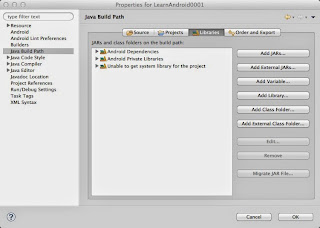
  • For each project, make sure that each has a valid Android target and Java system library
    • Right click on the project folder and click "properties"
    • Click on "Android" from the list on the left
    • Check an android version in "Project Build Target"
    • Click on "Java Build Path"
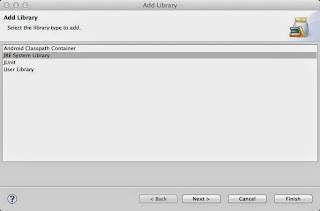
    • Click the "Add Library..." button on the right
    • Select "JRE System Library"
    • Choose an appropriate JRE and press "OK"

Explanation of the above steps:

The errors such as "The type java.lang.Object cannot be resolved" are due to the new ADT being unable to find the system's java library (or the library that is installed is currently invalid.) Pointing your project to the appropriate Java JDK should fix this problem. However, this doesn't fix everything.

The next errors regarding android.* and related means that the old ADT pointed to an Android target that likely no longer exists after the upgrade. Pointing the project to the new Android target should fix the problem (or installing the old versions should also do the trick.)

Hopefully this helped, though it definitely won't be a complete solution for everyone out there. Best of luck to you!

Other notes:

Note that the fix above worked for an upgrade to ADT version 23 using Eclipse Juno under OS X 10.9.3. Your mileage will most likely vary with different versions. The above steps were only listed in case someone out there finds them helpful.

Tuesday, 24 June 2014

Android CalledFromWrongThreadException

Problem:

When I try to run functions such as myView.setText(myText), I get something similar to the following error: CalledFromWrongThreadException: Only the original thread that created a view hierarchy can touch its views.

Solution:

Use Activity.runOnUiThread()

For instance, within your MainActivity (or whatever your activity class is named):


public void myFunctionCalledByAnotherThread() {
  // ... stuff ...

  runOnUiThread(new Runnable() {
    @Override
    public void run() {
      // ... code to modify ui such as View.setText() ...
    }
  });

  // ... other stuff ...
}


If you're outside of the Activity, you can also try getActivity():

getActivity().runOnUiThread( ... )

Explanation:

This error is caused by a thread other than the original thread that created the UI element/View, attempting to modify that view. An example of something that will cause this error is placing a setText() call into the run() function of a java TimerTask.

References:

Monday, 13 January 2014

Check if music is already playing on Android from within an Activity

Problem:

How do I check if music is already playing on an Android device from within an Activity?

Solution:

AudioManager aMan = (AudioManager)this.getSystemService(
                                         Context.AUDIO_SERVICE);
if(aMan.isMusicActive()) {
  // do stuff here if music is playing
}

Notes:

This check can be useful if your app needs to play music. This is because there are instances where attempting to play music using MediaPlayer while music is already playing will corrupt an audio stream on an Android device.

References:

Wednesday, 4 December 2013

Turn off "Say OK Google" voice search feature in KitKat

Problem:

I'd like to turn off the "Say OK Google" always-listening voice search feature in KitKat. How can I do so?

Solution:

One way to turn this feature off on the stock version of Android, is to navigate to Settings -> Language&Input -> Voice Search and then uncheck "Hotword detection".

References:

For more information on turning off this always-listening feature in both voice search as well as Google Now, you can check out the more detailed articles below:

Friday, 6 September 2013

Facebook Android SDK v3.5 tutorial workaround for error regarding android.support.v4.content.LocalBroadcastManager.getInstance

Problem:

In the very first Facebook SDK tutorial, when I finish the final steps to get a MainActivity.java that looks like the tutorial, instead of getting the message "Hello !" the app crashes and gives an error like "Could not find method android.support.v4.content.LocalBroadcastManager.getInstance, referenced from method com.facebook.Session.postActiveSessionAction", then followed by a bunch of exceptions, starting with "java.lang.NoClassDefFoundError: android.support.v4.content.LocalBroadcastManager".

My code looks exactly like the tutorial found at https://developers.facebook.com/docs/android/getting-started/facebook-sdk-for-android/. (For reference, the tutorial code as of September 6, 2013 is below, as it could be revised by now:)

package com.firstandroidapp;

import android.os.Bundle;
import android.app.Activity;
import android.content.Intent;
import android.widget.TextView;
import com.facebook.*;
import com.facebook.model.*;

public class MainActivity extends Activity {

  @Override
  public void onCreate(Bundle savedInstanceState) {
    super.onCreate(savedInstanceState);
    setContentView(R.layout.activity_main);

    // start Facebook Login
    Session.openActiveSession(this, true, new Session.StatusCallback() {

      // callback when session changes state
      @Override
      public void call(Session session, SessionState state, Exception exception) {
        if (session.isOpened()) {

          // make request to the /me API
          Request.executeMeRequestAsync(session, new Request.GraphUserCallback() {

            // callback after Graph API response with user object
            @Override
            public void onCompleted(GraphUser user, Response response) {
              if (user != null) {
                TextView welcome = (TextView) findViewById(R.id.welcome);
                welcome.setText("Hello " + user.getName() + "!");
              }
            }
          });
        }
      }
    });
  }

  @Override
  public void onActivityResult(int requestCode, int resultCode, Intent data) {
      super.onActivityResult(requestCode, resultCode, data);
      Session.getActiveSession().onActivityResult(this, requestCode, resultCode, data);
  }

}

Please Note First:

This problem and its workaround appears to be version specific. Your mileage may vary if the error isn't exactly the same as the one encountered. The versions of things used when this error was encountered were Android ADT v22, facebook-android-SDK-3.5, with a build target set to Android 4.2.2. All source code, tool, etc., were unmodified from the versions downloaded from Google and Facebook. This problem was worked around September 6, 2013, so hopefully someone from Facebook or Google's Android team has already made the appropriate fixes (making this post no longer needed =p).

Workaround:

This problem is caused by a missing method that the Facebook SDK is expecting to find in android.support.v4, but cannot find in the current version of the Android libraries. A hint to this is a strange error (which you may or may not have seen when importing the Facebook SDK demos into Eclipse) mentions that the versions of android.support.v4 do not match. The demos seem to run properly when compiled, however the very first Facebook SDK program you write yourself does not.

To work around this problem, the Facebook SDK version 3.5 includes a jar file you need to link to your project, located in "/path/to/facebook-android-sdk-3.5/libs/android-support-v4.jar".

One way to do this is as follows:

  • Go to your project's properties in Eclipse, then go to "Java Build Path"
  • Click on the "Libraries" tab
  • Click on either "Add JARs..." or "Add External JARs...", depending on which of the two you'd like to do
  • Add the android-support-v4.jar that comes with the Facebook Android SDK v3.5
  • Click on the "Order and Export" tab
  • Check the newly-imported android-support-v4.jar
  • Clean the project (Project->Clean...) (this step is important as attempting to re-run the project without cleaning it first or altering its code will simply run the existing binary again, which will give the error once more)

Additional Notes:

There's also another change in the tutorial which you may want to make. The function "Request.executeMeRequestAsync(session, new Request.GraphUserCallback() {....});" is deprecated in the v3.5 SDK. You can get rid of the "deprecated method" warning in Eclipse by changing the above code to "Request.newMeRequest(session, new Request.GraphUserCallback() {...}).executeAsync();".

Hopefully this post helped someone out there. I realize it's a pretty basic problem to debug for experienced coders, but I decided to post this anyway in case it came in handy.

Friday, 7 June 2013

Test if an app is running on an android emulator

Problem:

How do I test that my app is running on the Android emulator and not a real device?

Solution:

import android.os.Build;

...

if( "sdk".equals( Build.PRODUCT ) ){
 // do emulator specific stuff here,
 // like set configs that are missing
}

Notes:

Tested to work using ADT Build: v22.0.1-685705. Your mileage may vary with other versions.

Note that in some versions you might need to test that Build.PRODUCT is "google_sdk" or "sdk_x86" instead of "sdk". An easy way to find the string is to print the value of Build.PRODUCT to the log or console while running your app in the emulator, then use that string.

This test can be useful if one needs to set configurations that would normally work on a device by default (but be missing in the emulator, such as needing to call setEGLConfigChooser(...) prior to doing anything else with a GLSurfaceView, as of ADT Build: v22.0.1-685705).

Monday, 28 January 2013

Change Data Usage Cycle in Android 4.1.1

Problem:

How do I change the data usage cycle in Android 4.1.1? The option to change won't show.

Solution:

The first screenshot below illustrates the problem: it seems as though the option to change the billing cycle does not exist! Notice that mobile data is turned off at this point.

Turning on mobile data at first doesn't seem to fix the problem as seen in the screenshot below. The option to change billing cycles is still not there.

To work around this issue, try the following: exit the preferences to the home screen, and open the data usage preferences again. You should be able to see the option to change the billing cycle now.

Notes:

This seems to be a strange, intermittent problem with the interface. This solution was tested using Android 4.1.1 on a Galaxy Nexus. Your results may vary with other setups.

Wednesday, 2 January 2013

One workaround for Android not receiving MMS

Problem:

My Android (4.1) phone is often not receiving MMS messages in the Messaging app. It stays stuck on the "downloading" message. I have data turned on, so that's not the issue. I was also not roaming at the time. Sometimes Android would download the MMS messages, other times it would just remain on the MMS notification 'download'.

Workaround:

This workaround seemed to have success with my own device after several days of attempting other solutions (turning on/off background data, turning on/off wifi while 3G is turned on, etc.) Your mileage may vary, but hopefully it at least helps someone out there :)

  • in the Messaging app, go to the settings
  • scroll down to the "MULTIMEDIA (MMS) MESSAGES" section
  • uncheck "auto-retrieve"
  • when someone sends a MMS, click the "download" button that appears in place of the 'downloading ...' message
  • your message should now download, rather than forever remain on the "downloading..." message

Notes:

This was tested to work using Android 4.1.1 on a Samsung Galaxy Nexus while on the Fido network in Canada. Again, as many things can contribute to MMS messages not sending, your mileage may vary.

While this is not the ideal solution, most people will usually not be looking at a MMS message until they have the messaging app open in front of them, so hopefully this is an appropriate workaround for those who don't mind waiting a few seconds to manually download a MMS rather than have them automatically download.

By the way, if anyone at Google is reading this, hopefully this bug can be reproduced by your Android Messaging app team =) It's an intermittent bug and I have no idea how to reliably reproduce it, otherwise a bug report would have been filed by now! Have a great day!